Mailshot 11.0 Updates

Version 11.0 brings a couple of useful fixes for everyone, and optimisations for iOS26 and 27 and Liquid Glass.

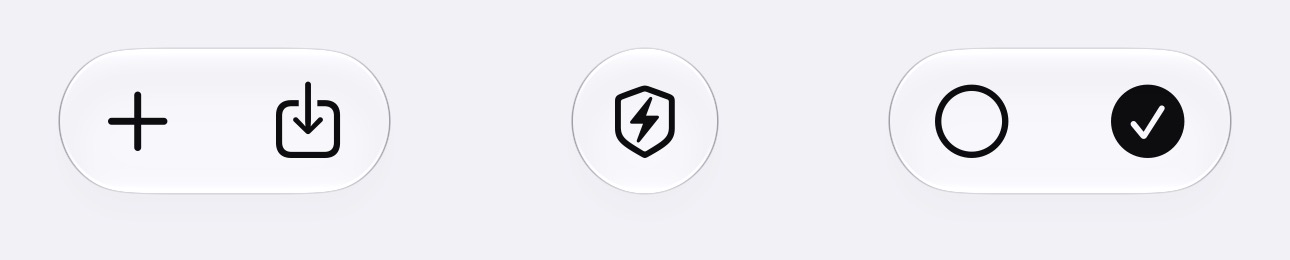
Buttons on the group edit page are now icons, representing ‘+’, ‘Import’, ‘Check Domains’, ‘Select None’ and ‘Select All’- All the same options as before, in the same order. (NOTE: That second icon is ‘Import’, not ‘Export’ or ‘Share’. Look there for multiple ways of importing contacts or entering them manually)


iOS26 blocked the Email Compose window’s Cancel button, preventing quitting an email or saving it to drafts. This update brings a workaround for iOS26, where you now tap outside the window to ‘Save To Drafts’ (there was no delete option possible). In iOS27, choose between “Delete” or “Save to Drafts” by pulling down from above the window.

The Email Compose window is now more robust when you move MailShot to the background, so iOS should be a lot less prone to lose your work when memory gets tight.

There were big enhancements to the Mailshot share extension, which lets you share things like photos to email groups from other apps. It now lets you send MANY more images at once (I have sent 40 fairly large images to a group, but this may still be limited by your email provider). TIP this can block memory for a while, so you may be unable to share twice in a row. A simple trick to free up this memory is to share a single image to Mailshot, then cancel it without sending

For those of you who have the optional Domain Checker, we now also check for internet domains with https:// websites, as well. This should prevent some false hits.

I hope you find the update useful.


ShotList adds .xlsx support

We recently fixed a bug in .xls import and export of project information to spreadsheets, and decided that it was time to also support the newer .xlsx format, as .xls is becoming less common (and some apps, like Numbers, no longer support it directly.)

This feature is added from version 13.1, which has just been submitted to Apple and will be released in around a week. I hope you find it helpful.

The first time you export, you will be asked to choose between .xls and .xlsx. If you need to change this later, you can do so from the ShotList page in Settings.

ShotList can still import either type of file, without needing to make a change in Settings.

MailShot Can Check Your Email Domains

A common reason your email provider may reject a group email is because it contains one or more bad email addresses.

If an email is addressed to a non-existent domain ( the bit after the @ sign) due to a typing error, or their provider going out of service, it can be very frustrating working out which is the cause.

A new optional plug-in for MailShot will check the domain of every address in a group for you, highlighting any that do not respond.

You can do this at any time from the “Check” button at the bottom of the address list, it will also automatically check any new addresses you add in future.

tap the “Check” button to use or purchase the plugin

If you scan, it will pop up a message to say that everything is OK…


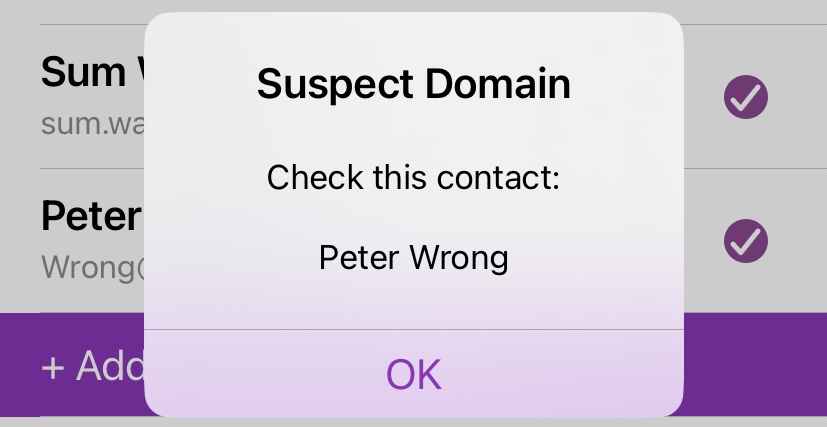
or that there was a problem…


And the problem domains will also be highlighted in blue for you…


NOTE: This won’t catch EVERY problem that might prevent an email being accepted ( you are still subject to the limits on how many emails you can send at once, or per day, and how large an email can be), and some private email domains may not respond when queried, but it should help you know where to look to track down one of the more common reasons that emails are refused.

The Domain Checker plugin is available as an in-app purchase for MailShot and MailShot Pro. There is no ongoing subscription cost. To learn more, tap “Check” at the bottom of the list of email addresses.

PlayRight- A “Sorting Hat”

Soluble has today released its newest app- ‘PlayRight’. A better way to choose teams for games, drama or improv performances which ensures every player gets a fair turn, and gets to play with a good mix of other players.

Developer Peter Johnson, said “I went to an improv show where they were drawing player names out of a hat for each game, but they’d sometimes get mixed up and put names back in, or keep pulling out the same pairings of people. As I was surprised that I couldn’t find an app to do it better, I wrote one”

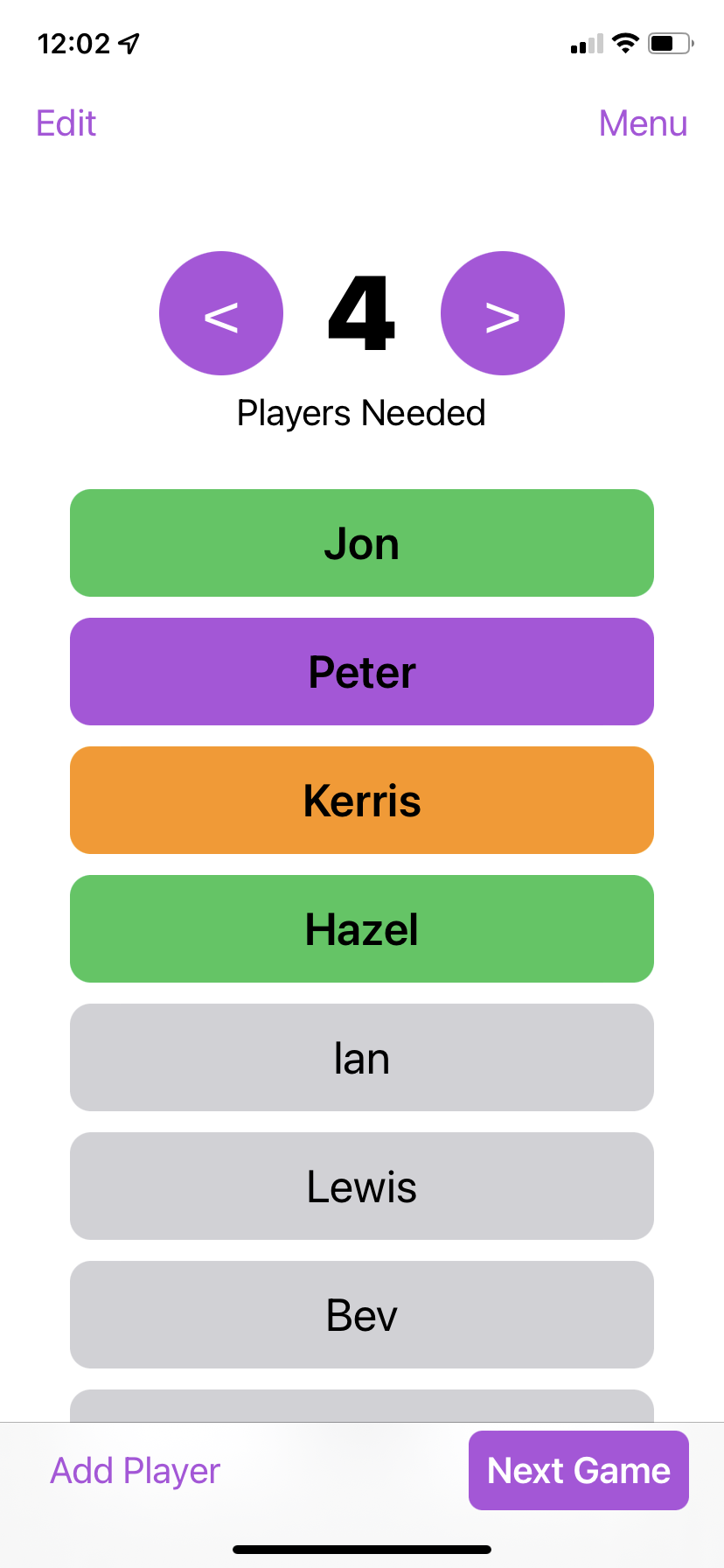
Add players, then select how many you’ll need for the next game. The app will track how many times each person plays, how long they’ve sat out for, and how many times they’ve played with each of the other players, then picks the best possible group for the next game.

If you want to include or exclude a player (perhaps they had asked to play a particular game? or two of the players don’t get on well?) you can move them into or out of the next game before announcing who will play.

Try it out as a free download with up to 4 players, a one-off purchase will upgrade it to remove the limit on player numbers.

You can find ‘PlayRight’ on the App Store for iPhone, iPad, iPod touch and M1 Mac, on iOS 15 and above.

MailShot 9.8: Search and M1 Macs

Our latest version of MailShot adds a “Search” feature, as requested by some of our users who wanted to be able to know which groups a particular contact was in.

Tap the Magnifying Glass at bottom right of the Groups page, and enter part of a name or email address to search for. You will see a list of the groups that string was found in, if any, and how many instances of it were found in each group.

The app also improves support for M1 Macs running iOS. Apple APIs do not allow addressing an email in the Bcc line on the Mac, and Bcc is really important for user privacy, so Macs now use “Alternative email app” methods by default, which allows Bcc.

GroupShot creates groups for Mail, (and works great alongside MailShot!)

We have just released GroupShot, which allows you to create and manage groups in your address book. This enables you to send or forward email to those groups right from the Mail app, just by entering the group name.

You can create groups from your Contacts, or import them from lists of names and addresses. But as we know many of our users will have both apps, we have also added the unique ability to import MailShot groups and turn them into address book groups, automatically making sure all the contacts are copied or created in the correct places.

Our two apps serve different needs- Mailshot is great if you have large groups of people that you don’t want cluttering up your Contacts. Whereas GroupShot is easier to use for sending and forwarding email, as you can do it right within the Mail app.

Try GroupShot out with a free trial period, on the App Store:

Mailshot Update 9.5

This is a small app update. A user wanted to be able to divide their Mailshot groups up into subgroups matching the size limits imposed by their email provider (typically 100, 50 or 25).

You could already divide into subgroups of 100, but now you can change the size of these groups to match your provider’s limit.

Enter your desired limit into the “Subgroup size” on the Mailshot page in Settings (the default is 100). Now when you select a group, tap “More…” and then “Split”, it will create a series of smaller groups of that size or less, and will rename the existing group by appending “-ALL” to its name.

Watch The Skies

Well, maybe not the skies… but watch for an announcement soon about the app we have been working on for the past few months.

This builds upon the success of our Mailshot app, and the knowledge that went into creating it, to provide a different approach that hides much of the complexities of email groups on iOS, which I am sure some of our users will be very excited by!

MailShot 9.2 Update: Using Alternate Email Apps

At its launch MailShot was built around the Mail system provided by iOS, and required the Mail app to be installed, with at least one email account configured.

In iOS14 Apple have added the ability to set a different email app as your default, so that web links etc. would call an alternate email app, such as Gmail, Outlook, Spark, Yahoo and others. Mailshot now supports sending email to your groups directly through these alternate email apps, instead of Mail.

How to use alternate apps

Set your desired email app as your default (typically from a setting on its own Settings page). Then enable “Allow Alternate Apps” on the Mailshot page, in Settings.

TIP: If you don’t have iOS Mail, MailShot will now attempt to use an alternative email app, irrespective of the setting of that switch.

Limitations and Differences

This feature relies on an internet-standard way of opening email apps, which has some limitations, compared to the old Mail-based system.

You can’t specify which default email account to use, so any “From:” line you set in Mailshot’s settings will be ignored.

You can’t include attachments from a share extension (such as documents, contacts or Photos) through alternate email apps, so Mailshot will offer to send via Mail, if you include attachments.

Note that you need to run the main app after making changes to Mailshot’s Settings, so the share extension can discover the changes.

Mailshot 9.1 Update- Save as .CSV

You now see a simplified menu when you tap a group name, focusing on the various send options.

Less commonly-used functions such as “Rename” “Duplicate” and “Print” can now be accessed by tapping the “More…” button.

This is also where you will find the new “Save as .CSV” feature, which I added as a result of customer requests. This will export your group as a .CSV file. The file this creates can be found in the “Mailshot” folder in the “On My iPhone” (or “On My iPad”) section of the Files app, from where it can easily be loaded into Numbers or other popular spreadsheet apps, or emailed to someone.

MailShot Update 8.5: Attack Of The Clones*

The new version of MailShot and MailShot Pro addresses something only discovered recently, which is that some providers do not accept any email with an address repeated. Error messages from the providers never really explained the problem, and it was only detective work by a user which revealed it.

This could happen if, for example, a couple use the same email address with different names.

Mailshot already takes steps to prevent you adding an email address again, but there was a way you could add them both at once using the Contact Checklist.

The new update prevents you adding the same address in this way, and scans your groups to fix any cases where this has already happened.

* Yes, this is a Star Wars reference

EditPoint 1.2 adds variable speed, Lockscreen controls and Dark Mode

The latest update for our EditPoint app, for marking up changes needed to audio files such as podcasts and radio shows, includes a few exciting additions…

You can now change the playback speed to skip through a file at up to 2x if you’re trying to refresh your memory, or locate something that was said. Tap the Speedometer to the right of the transport controls, and select the desired speed between 1.0 and 2.0. Small speed increases are subtle and don’t degrade the audio quality too much, anything over 1.4x gets quite glitchy, but may be useful to some of you.

The Lock Screen now shows playback controls for your file, and tapping the icon takes you directly to the app. It also now supports pausing and resuming from headphones or bluetooth devices without switching control to other audio apps.

We now also support iOS 13’s Dark Mode, which you can enable from the Control Centre.